
Jul 3, 2026
Understanding the Value of Distributed Compute
Introduction
Hazelcast is a powerful platform. It delivers the power of a highly reliable, distributed cache. Equally important is the reality that Hazelcast accomplishes speed through its in-memory data access operations. Said another way, Hazelcast is a memory first architecture. This differentiates Hazelcast from many other wonderful technologies such as Snowflake that attempt to keep in memory the things that are accessed most frequently. With Hazelcast’s most common deployment approach, all data is held in memory. As such, there are no network or disk penalties to access your data. The resulting impact of this is optimal performance coupled with minimal latency to access your data.
Yet with all this power so few ever take the next step of leveraging Hazelcast’s compute capabilities. In this article we will learn and appreciate how compute operations can improve performance for certain data operations. Using Hazelcast’s compute capabilities, we will send our much smaller compute job to our cluster hosts that hold significant amounts of data. Furthermore, we will limit the compute task on each host to operate on only the data that is local to that host. This approach significantly reduces the use of the network and maximizes the use of all cluster CPUs to produce an answer in record setting time. Of equal value is the reality that each host holds a fraction of the aggregate data set. Think of it this way: If one host holds all data then a scanning operation is limited to that host’s capabilities. But if we divide the data by housing ¼ of it on each of 4 hosts then we now have 4 hosts scanning ¼ of the data in parallel. This will always be faster than one single host scanning the entire data set.
And for one last added bonus we will also leverage the value of data affinity to further minimize the transmission of data over the network to accomplish our desired answer. So let’s get you some background details to aid in your understanding.
Domain
For this example we will show 3 distributed IMaps that will be used for this article. These IMaps will form a rudimentary trading application that represents buyers, their associated trades and for our compute job we will execute a distributed job to calculate the current total spend for each buyer by scanning and summing the amount of money each buyer has spent given the trades that are currently in the system.
Pictured below is a view of our example domain:
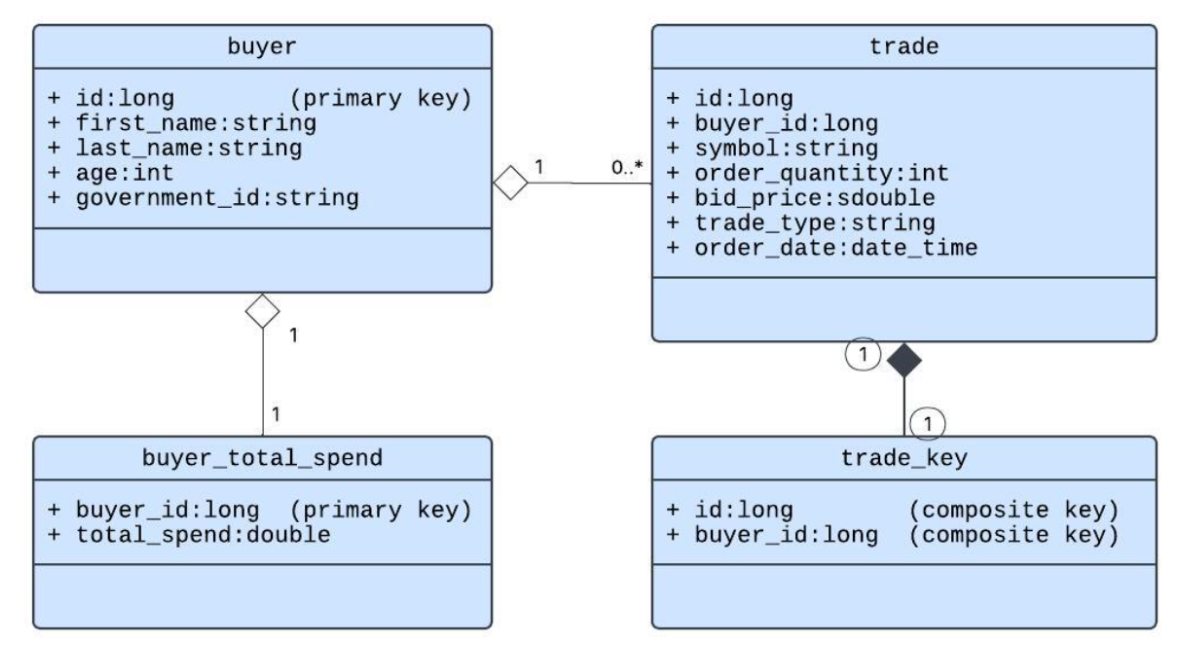
Take note that both buyer and buyer_total_spend classes use their respective id fields as their key. Hazelcast will apply a hash function to each buyer’s id to determine which partition that buyer entry will be stored in. Similarly, since the buyer_id will be the same as an associated buyer’s id field these two instances will always be stored in the same partition and as a consequence will always be available on the same host as the associated buyer.
Domain Affinity
By contrast the trade class uses a trade_key class which has a composite key that includes a distinct id and the associated buyer’s id (aka: buyer_id). The id by itself would be sufficient for a primary key, but if trades were stored by their id alone then there would never be any assurance that the trades for any given buyer would be in the same partition as the associated buyer. Without the use of affinity, calculating each buyer’s total spend would require the network transmission of trade instances to the host that is making the calculation for a given buyer and as a consequence performance would be negatively impacted.
So how do we fix that? We force the Hazelcast system to place trades for their associated buyers in the same partition as the buyer instance by using a composite key and telling the system to use the buyer_id field as the affinity field when it stores trade instances. When this is done we can now launch a compute job on any host knowing full well that all trades for any given buyer will be guaranteed to be in the same partition and subsequently on 1 single host at any given time. The impact is that performance is greatly improved due to the elimination of data transfers over the network if no affinity was used.
The list below details the advantages of affinity based processing:
- Each compute task operates on only local data
- Each compute task operates over a fraction of the total data set
- All data is accessed in memory with no network transmission of data needed to produce a correct answer.
- The results of the calculation are saved on the same host that produced the calculation for a specific buyer because its primary key is the same as the associated buyer
- We leverage the CPU’s of all hosts.
Data Affinity Caveats
Ensuring that data is local to one host sounds great. Why not do that for all classes? To prevent our readers from creating bad data sets, let’s use the example of sales. For a US based company that only sells its products to customers in the US, why not store customers and their sales by state?
The answer is two fold:
- Too few partitions: You see, there are only 50 states, so you would only have 50 possible partitions that you could put data into and that even assumes that each state would get a separate partition.
- Data skew: Some states such as Alaska, Alabama and Mississippi are small population wise and as such would likely have far fewer sales than say California, New York or Texas for example.
The criteria for a good affinity field are:
- A field that has high cardinality. Your field cardinality should be much higher than the number of partitions which is 271 by default.
- A field that when distributed by affinity will exhibit even data distribution.
So now let’s consider the affinity choice for this article. We have buyers that would have random distribution over our default number of partitions and approximately even distribution over our cluster hosts. Since random buyers would also most likely exhibit random purchasing patterns then it “might” be reasonable to assume that trades would distribute with approximately even data skew. With that said, before I would actually make this choice, I would verify the data distribution before executing on an unknown for any production system.
Data Affinity Implementation
Throughout the example code I have used Generic Record instances for all data insertions and updates. The choice of Generic Records alleviates the need to deploy domain classes to your Hazelcast cluster members. This avoids cluster restart operations to deploy changes in your domain model. To implement an IMap leveraging data affinity, you will need to update your Hazelcast cluster members with map configurations that detail which data field or fields are to be used for affinity. A snippet of the hazelcast.xml configuration file used for the demo code is shown below:
Partition Attribute Configuration
<?xml version="1.0" encoding="UTF-8"?>
<hazelcast xmlns="http://www.hazelcast.com/schema/config"
          xmlns:xsi="http://www.w3.org/2001/XMLSchema-instance"
          xsi:schemaLocation="http://www.hazelcast.com/schema/config
          http://www.hazelcast.com/schema/config/hazelcast-config-5.6.xsd">
   ...
   <map name="trade">
       <partition-attributes>
           <attribute>buyer_id</attribute>
       </partition-attributes>
   </map>
   ...
</hazelcast>
Adding data by affinity can be done as follows:
Trade Insertion Example Code
Disclaimer: The following code is an example that demonstrates affinity using Hazelcast’s Attribute Based Partition Strategy. This code is not intended to be construed as production ready code. It serves as a functional example only.
public static final String TRADE__TABLE_NAME = "trade";
public static final String TRADE__ID = "id";
public static final String TRADE__BUYER_ID = "buyer_id";
public static final String TRADE__SYMBOL = "symbol";
public static final String TRADE__ORDER_QUANTITY = "order_quantity";
public static final String TRADE__BID_PRICE = "bid_price";
public static final String TRADE__TRADE_TYPE = "trade_type";
public static final String TRADE__TRADE_TIME = "trade_time";


addTrade(buildTrade(30L,10L,220.43,805,"Google","limit","2025-12-02T16:19:27.915Z"));


private GenericRecord buildTrade(long id, long buyer_id, double bid_price,
   					int order_quantity, String symbol,
                                	String trade_type, String trade_time) {
   GenericRecord result = GenericRecordBuilder.compact(TRADE__TABLE_NAME)
           .setInt64(TRADE__ID, id)
           .setInt64(TRADE__BUYER_ID, buyer_id)
           .setFloat64(TRADE__BID_PRICE, bid_price)
           .setInt32(TRADE__ORDER_QUANTITY, order_quantity)
           .setString(TRADE__SYMBOL, symbol)
           .setString(TRADE__TRADE_TYPE, trade_type)
           .setTimestamp(TRADE__TRADE_TIME,
 				LocalDateTime.ofInstant(Instant.parse(trade_time),
                   		ZoneId.systemDefault()))
           .build();
   return result;
}


private void addTrade(GenericRecord trade) {
   IMap<GenericRecord, GenericRecord> tradeMap = hzI_.getMap(TRADE__TABLE_NAME);
   GenericRecord tradeKey = buildKeyForTrade(trade);
   tradeMap.put(tradeKey, trade);
   System.out.println("Added Trade for " + tradeKey.toString());
}


private GenericRecord buildKeyForTrade(GenericRecord trade) {
   GenericRecord result = GenericRecordBuilder.compact(TRADE__TABLE_NAME)
           .setInt64(TRADE_KEY__ID, trade.getInt64(TRADE__ID))
           .setInt64(TRADE_KEY__BUYER_ID, trade.getInt64(TRADE__BUYER_ID))
           .build();
   return result;
}
Data Affinity Awareness
Please be aware that the configuration that is detailed above Partition Attribute Configuration happens to be a Hazelcast cluster only configuration at this time. One of the important and even critical implications of this is that only Hazelcast cluster members are aware of this configuration. As such, in order to get data inserted into a Hazelcast cluster with your configured affinity applied the data MUST be inserted using some form of a compute job. If data is inserted from a client based job the client, not being aware of the partition attribute, will not provide the same data affinity as the data inserted via a compute or distributed job. The demo program listed at the end of this article shows trade instances being inserted using a compute job.
Note too that there are other approaches to achieving data affinity such as String Partition Strategy, but these carry associated challenges under certain circumstances. For the purposes of this article we focus on Attribute Based Partitioning Strategy.
Please see the following link for additional information on Data Affinity: https://docs.hazelcast.com/hazelcast/5.7/cluster-performance/data-affinity
Compute Job Implementation
Now that we have a solid background in all things related to the benefits & value of distributed computing with affinity, all that is needed is some of the compute job implementation details. The code below is our example compute job. The code accesses the distributed trade Map. Of importance is that it iterates over only the local values which were accessed via the following code line:
Set<GenericRecord> localTrades = trades.localValues();
The values are iterated and the code computes the trade total for each trade and stores that calculation into a local HashMap. For any subsequent trade if a prior value exists for the current buyer then the local accumulation is retrieved and updated for the current trade.
After all trades have been processed then the accumulations for all buyers are saved into the buyer_total_spend IMap. Note that all buyer_total_spend instances will also be stored on the same host where the calculation was executed because each buyer_total_spend instance uses the same buyer_id value as its associated buyer instance.
Total Spend Compute Job
Disclaimer: The following code is an example that demonstrates affinity using Hazelcast’s Attribute Based Partitioning Strategy. This code is not intended to be construed as production ready code. It serves as a functional example only.
package com.hz.computejob;


import com.hazelcast.core.HazelcastInstance;
import com.hazelcast.core.HazelcastInstanceAware;
import com.hazelcast.map.IMap;
import com.hazelcast.nio.serialization.genericrecord.GenericRecord;
import com.hazelcast.nio.serialization.genericrecord.GenericRecordBuilder;


import java.io.Serializable;
import java.util.Collection;
import java.util.HashMap;
import java.util.Map;


import static com.hz.computejob.DomainFields.*;


public class TotalSpendComputeJob implements Runnable, HazelcastInstanceAware,
 							Serializable {


   private static final long serialVersionUID = 1L;


   private transient HazelcastInstance hzI_;


   @Override
   public void run() {
       try {
           IMap<GenericRecord, GenericRecord> trades = hzI_.getMap(TRADE__TABLE_NAME);
           System.out.println(trades.size() + " number Trade instances.");


           Collection<GenericRecord> localTrades = trades.localValues();
           System.out.println(localTrades.size() + " number local Trade instances.");
           // We only want to work on Trade instances that are local to this host
           // As such we are invoking "localValues()" to eliminate network
           // transmission of non-local Trades.
           Map<Long, GenericRecord> localSpndAccumulations = new HashMap<>();
           for(GenericRecord localTrade : localTrades) {
               System.out.println("Processing trade: " + localTrade.toString());
               long currentBuyerId = localTrade.getInt64(TRADE__BUYER_ID);
               double curSpndAmnt = localTrade.getFloat64(TRADE__BID_PRICE) *
 						localTrade.getInt32(TRADE__ORDER_QUANTITY);
               if (localSpndAccumulations.containsKey(currentBuyerId)) {
                   GenericRecord lclSpendAccum =
 				localSpndAccumulations.get(currentBuyerId);
                   GenericRecord updatedSpend = lclSpendAccum.newBuilderWithClone()
                           .setFloat64(BUYER_TOTAL_SPEND__TOTAL_SPEND,
                 		roundResult(lclSpendAccum.getFloat64(
  			 	BUYER_TOTAL_SPEND__TOTAL_SPEND) + curSpndAmnt))
                           .build();
                   localSpndAccumulations.put(currentBuyerId, updatedSpend);
               } else {
                   GenericRecord buyerTotalSpend =
 				GenericRecordBuilder.compact(BUYER_TOTAL_SPEND__TABLE_NAME)
                           .setInt64(BUYER_TOTAL_SPEND__BUYER_ID, currentBuyerId)
                           .setFloat64(BUYER_TOTAL_SPEND__TOTAL_SPEND,
  						roundResult(curSpndAmnt))
                           .build();
                   localSpndAccumulations.put(currentBuyerId, buyerTotalSpend);
               }
           }
           IMap<Long, GenericRecord> totSpndMap =
 						hzI_.getMap(BUYER_TOTAL_SPEND__TABLE_NAME);
           totSpndMap.putAll(localSpndAccumulations);
           System.out.println("Saved " + localSpndAccumulations.size() +
 					" # BuyerTotalSpends");
       } catch (RuntimeException re) {
           System.out.println("Caught RuntimeException " + re.toString());
       }
       System.out.println("Exiting run implementation now");
   }


   @Override
   public void setHazelcastInstance(HazelcastInstance hazelcastInstance) {
       System.out.println("Hazelcast instance has been set.");
       hzI_ = hazelcastInstance;
   }


   private double roundResult(double input) {
       return Math.round(input * 100) / 100D;
   }


}
The above code is only about 3 to 4 thousand characters. The class size is only about 5 Kb. Now imagine a system that holds thousands of buyers and millions of trades across tens of hosts. Quite frankly implementing this with a compute job should be your default go to.
Compute Job Completion
Now that we have an example compute job implementation how do we know that the job completed. For this we implement a MultiExecutionCallback interface as follows:
Total Spend Execution Callback
Disclaimer: The following code is an example that demonstrates affinity using Hazelcast’s Attribute Based Partition Strategy. This code is not intended to be construed as production ready code. It serves as a functional example only.
package com.hz.computejob;


import com.hazelcast.cluster.Member;
import com.hazelcast.core.MultiExecutionCallback;
import java.io.Serializable;
import java.util.Map;


public class TotalSpendExecutionCallback implements
       MultiExecutionCallback, Serializable {


   private boolean jobCompleted;


   public TotalSpendExecutionCallback() {
       jobCompleted = false;
   }


   public boolean getJobCompleted() {
       return jobCompleted;
   }


   @Override
   public void onResponse(Member member, Object o) {
       System.out.println("A cluster member completed compute job");
   }


   @Override
   public void onComplete(Map<Member, Object> map) {
       jobCompleted = true;
       System.out.println("All cluster members completed compute job");
   }
}
Compute Job Distribution & Execution
Now let’s get our compute job distributed and executed. For this we will submit the job to all cluster members. Note that there are many other options for distribution & execution. You can submit to one host or some hosts, but understand that in these instances you will need to know which host to target to leverage the value of compute next to data. In our instance, we simply distribute to all hosts and ask each task to execute against the local data.
Launch Compute Job
Disclaimer: The following code is an example that demonstrates affinity using Hazelcast’s Attribute Based Partition Strategy. This code is not intended to be construed as production ready code. It serves as a functional example only.
package com.hz.computejob;


import com.hazelcast.core.IExecutorService;


public class LaunchComputeJob {


   public static void main( String[] args ) throws java.lang.Exception
   {
       try(HZClient hzClient = HZClient.getHZClient()) {
           IExecutorService exeSvc =
                   hzClient.getBuyerTotalSpendExecutorService();
           try {
               TotalSpendComputeJob tscj = new TotalSpendComputeJob();
               TotalSpendExecutionCallback tsec = new TotalSpendExecutionCallback();
               exeSvc.submitToAllMembers(tscj, tsec);
               while(!tsec.getJobCompleted()) {
                   Thread.sleep(1000);
               }
           } finally {
               exeSvc.shutdown();
               exeSvc.destroy();
           }
           System.out.println("Compute job terminated normally: ");
       }
   }


}
Summary
Compute job execution may very well be your best option for achieving maximum performance for any data operations that require executing against large amounts of data. When compute is leveraged you are employing the power of:
- All CPUs in your cluster
- Memory based data access
- Minimal network operations
- Each cluster host scanning only a subset of your overall data
If you are not yet leveraging these benefits it is my hope that with the above understanding and example code you can optimize your next implementation and WOW your friends and colleagues with your new found capabilities.
Reference Material
Data Affinity:
https://docs.hazelcast.com/hazelcast/5.7/cluster-performance/data-affinity
Hazelcast distributed computing documentation:
https://docs.hazelcast.com/hazelcast/5.7/computing/distributed-computing
Hazelcast execution service:
https://docs.hazelcast.com/hazelcast/5.7/computing/executor-service
Code github:
https://github.com/hazelcast/ComputeJob