Tomasz is a Senior Software Engineer I in the Core Team at Hazelcast with more than 10 years of experience in software engineering, most of the time working with high performance, distributed systems.
View all blogs by the authorFeb 19, 2026
Resilient user sessions are easier than you think with Hazelcast Spring Session
Most web applications rely on user sessions in some way – to track login state, shopping baskets, or other data that makes the experience more personal.
The problem is that sessions are often stored directly inside the application server. When that instance goes down – and it will – the sessions disappear with it. Load balancers help distribute traffic, but they don’t magically make session state resilient, and as we’ve all seen, in a regional outage it certainly won’t.
This year, Hazelcast took over the stewardship of the Spring Session Hazelcast module. Since then, we’ve worked to ensure compatibility with Spring Session 4.x and Spring Framework 7 / Spring Boot 4 and we’ve improved the overall developer experience. In this post, I want to show how easy it is to make your sessions resilient using Hazelcast Spring Session.
Scenario
Let’s imagine a very common scenario – an online shop.
This shop tracks several things inside user sessions:
- Login status
- Current shopping basket
- Items in the basket
- Quantity and price at the time items were added
- Last 50 visited products (for recommendations)
The application uses Spring Boot as its main framework – a very popular choice for Java web applications.
Some of the domain classes might look like this:
- principalName – Spring Security’s attribute to track the logged in user
- Basket represented as record Basket (String principalName, List<BasketItem> items)
- record BasketItem (ProductDto product, BigDecimal orderPrice, int quantity)
- record ProductDto(long id, String name, BigDecimal listPrice)
The main controller, ShopController, exposes endpoints to add items to the basket and to view its current contents:
@RequestMapping("/basket/add")
public String addToBasket(HttpSession session, @RequestParam("items") Set<Long> items) {
   Basket basket = getBasketAttr(session);
   Map<Long, ProductDto> productDtoMap = products.getAll(items);
   productDtoMap.forEach((_, productDto) -> basket.items().add(new BasketItem(productDto, productDto.listPrice(), 1)));
   session.setAttribute("basket", basket);
   return items.size() + " items added";
}
The only thing we need in the controller is a HttpSession parameter. If you debug the application, you’ll see that Spring wraps a HazelcastSession underneath – provided by the Hazelcast Spring Session module.
If your application uses Spring Security – and most do – integrating it with Spring Session is super easy. You only need to add session management configuration like this:
.sessionManagement((sessionManagement) -> sessionManagement
                          .maximumSessions(2)
                          .sessionRegistry(sessionRegistry())
                 )
Why local sessions don’t scale
Typically, sessions are stored inside the Servlet Container. You can run multiple containers, but session data isn’t replicated between them. If an instance goes down, users will lose their session, including their shopping basket.
For applications expecting high traffic, this isn’t acceptable – nobody likes it when a shop suddenly forgets everything in their basket because of a 502 error.
This is exactly the problem Hazelcast Spring Session solves.
Hazelcast Spring Session to the rescue
Hazelcast Spring Session allows you to store the session data in a Hazelcast cluster, distributed across multiple members.
First, add the dependency to your project:
<dependency>
    <groupId>com.hazelcast</groupId>
    <artifactId>hazelcast-spring-session</artifactId>
    <version>4.0.0</version>
</dependency>
Now, open your configuration class and add the following annotation:
@EnableHazelcastHttpSession
That’s the basic setup – yay!
You’ll also need to add a HazelcastInstance bean. Once that’s done, you can start your application and your sessions are distributed across the cluster.
Our session map will be called shopSessions, referenced by the SESSION_MAP_NAME constant:
@EnableHazelcastHttpSession(sessionMapName = SESSION_MAP_NAME)
Adding resilience with backups
Now, let’s make the sessions resilient.
Configuring backups for session data in Hazelcast is as simple as:
config.addMapConfig(new MapConfig(SESSION_MAP_NAME).setBackupCount(1));
This ensures each session entry is stored on another cluster member as a backup. If one node goes down, session data is still available. Pretty easy, right?

Multi-region resilience with WAN Replication
If you want to go further and protect user sessions against a full regional outage, Hazelcast Enterprise supports WAN replication (often called geo-replication) between clusters.
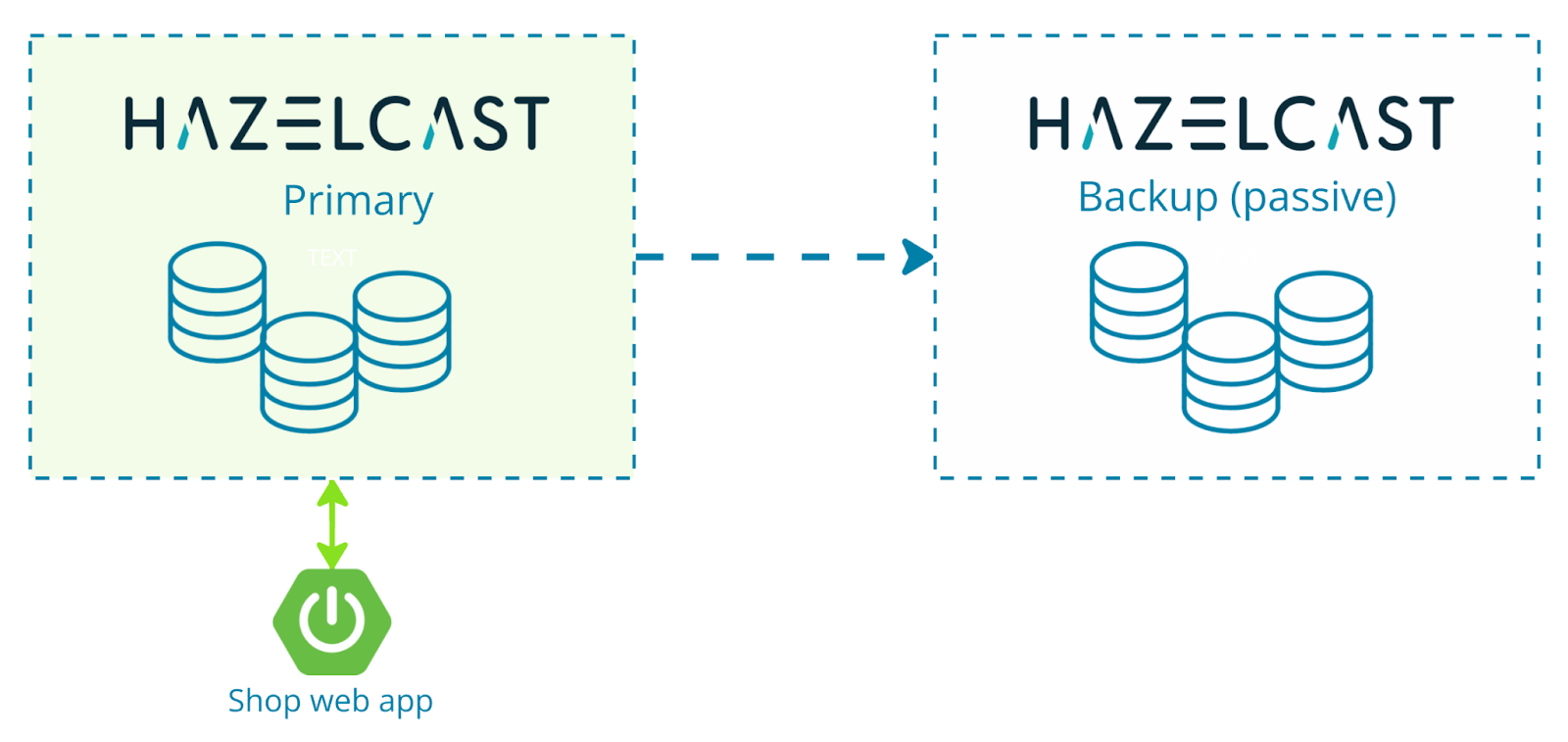
In a typical active–passive setup, one cluster acts as the primary location for session writes, while another cluster keeps a replicated copy. If the primary region goes down, applications can switch to the secondary cluster and continue working with existing sessions.
Adding WAN replication isn’t too complicated, although there’s a bit more configuration to it (after all, it’s inter-cluster communication!). A simple active-passive configuration looks like this:
WanReplicationConfig wanReplicationConfig = new WanReplicationConfig();
wanReplicationConfig.setName("sessionReplication"); <1>
WanBatchPublisherConfig publisherConfig = new WanBatchPublisherConfig();
publisherConfig.setClusterName("us-server");
publisherConfig.setTargetEndpoints("us-server:5701"); <2>

wanReplicationConfig.addBatchReplicationPublisherConfig(publisherConfig);
config.addWanReplicationConfig(wanReplicationConfig);

WanReplicationRef wanReplicationRef = new WanReplicationRef();
wanReplicationRef.setName("sessionReplication");
Here we configure the name of the replication (<1>) and a publisher (<2>) that contains the connection details for the target cluster.
Next, we attach this WAN replication configuration to the session map:
config.addMapConfig(new MapConfig(SESSION_MAP_NAME)
    .setBackupCount(1)
    .setWanReplicationRef(wanReplicationRef));
With this configuration, your session data is asynchronously replicated to the remote Hazelcast cluster named us-server.
Active-active replication
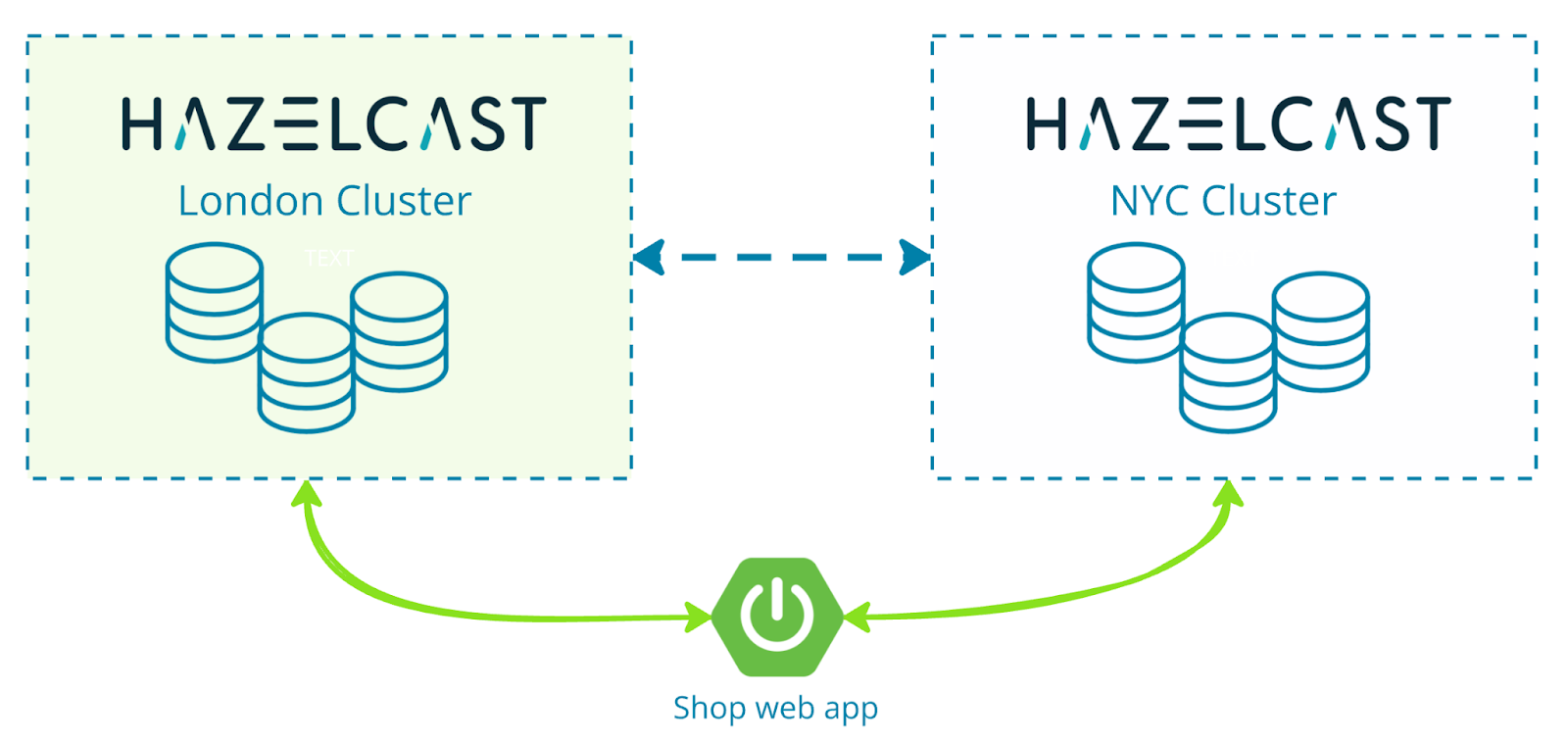
Going one step further again, Hazelcast Enterprise also supports active-active WAN replication, where multiple clusters can accept writes at the same time and replicate session data to each other. This is useful when you want applications running in different regions to operate independently, while still keeping session data synchronized across clusters.
Let’s look at a simple docker-compose.yaml that starts two Hazelcast Enterprise clusters, one in London and one in New York City:
services:
  london-cluster:
    image: hazelcast/hazelcast-enterprise:latest
    hostname: london-cluster-1
    ports:
      - "5701:5701"
    volumes:
      - ./conf-lon:/opt/hazelcast/config
    env_file:
      - licensekey.env
    environment:
      - HAZELCAST_CONFIG=/opt/hazelcast/config/config.yml

  nyc-cluster:
    image: hazelcast/hazelcast-enterprise:latest
    hostname: nyc-cluster-1
    ports:
      - "5702:5701"
    volumes:
      - ./conf-newyork:/opt/hazelcast/config
    env_file:
      - licensekey.env
    environment:
      - HAZELCAST_CONFIG=/opt/hazelcast/config/config.yml
The Hazelcast configuration files used by both clusters contain WAN replication settings similar to the earlier configuration. What’s important in them is that the NYC cluster points to the London cluster and vice-versa, enabling bi-directional replication.
Here’s a snippet from London cluster configuration showing this:
wan-replication:
   # <1>
   replicate-to-nyc:
     batch-publisher:
       nycPublisher:
         cluster-name: nyc-cluster
         target-endpoints: "nyc-cluster-1:5701"
 map:
   shopSessions:
     wan-replication-ref:
       replicate-to-nyc:
      # <2> using active-active requires merge policy
         merge-policy-class-name: PutIfAbsentMergePolicy
     backup-count: 1
     # because we are modifying IMap's config not via sessionMapConfigCustomizer, we need to add the index manually
     indexes:
       - type: HASH
         attributes:
           - "principalName"
We configure standard WAN replication <1> and then apply it to the shopSessions map. Because both clusters can update the same session data, we must define a merge policy to resolve potential conflicts, as seen in <2>. In this example, PutIfAbsentMergePolicy ensures existing session entries are not overwritten when replicated from the other cluster, which works well for session data.
That’s all we need on the cluster side. The NYC configuration mirrors this setup, pointing back to the London cluster.
In the shop application itself, you only need to replace the HazelcastInstance bean declaration with a client failover configuration:
@Bean
@SpringSessionHazelcastInstance
@ConditionalOnExpression("${use.wan.replication:false} == true")
public HazelcastInstance hazelcastClient() {\
// <1>
    ClientConfig config = new ClientConfig();
    // some configuration
    applySerializationConfig(config);
    config.setClusterName("nyc-cluster");
    // <2>
    ClientConfig config2 = new ClientConfig();
    // some configuration
    config2.setClusterName("london-cluster");

    // <3>
    return HazelcastClient.newHazelcastFailoverClient(new ClientFailoverConfig()
.addClientConfig(config2)
.addClientConfig(config)
.setTryCount(10));
    }
Here we configure connections to both clusters <1> and <2> and pass them to the failover client <3>. If one cluster becomes unavailable, the client automatically connects to the other.
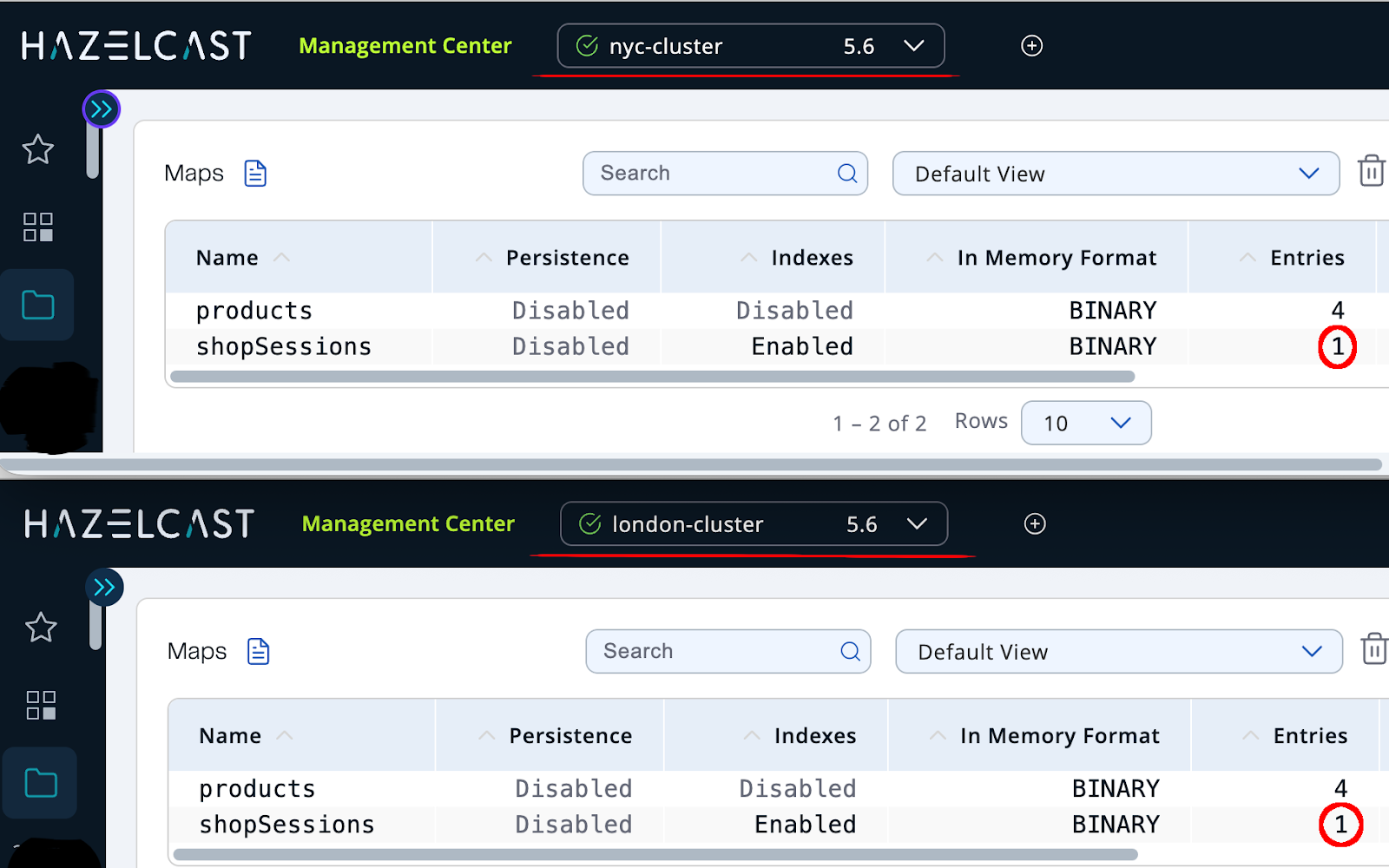
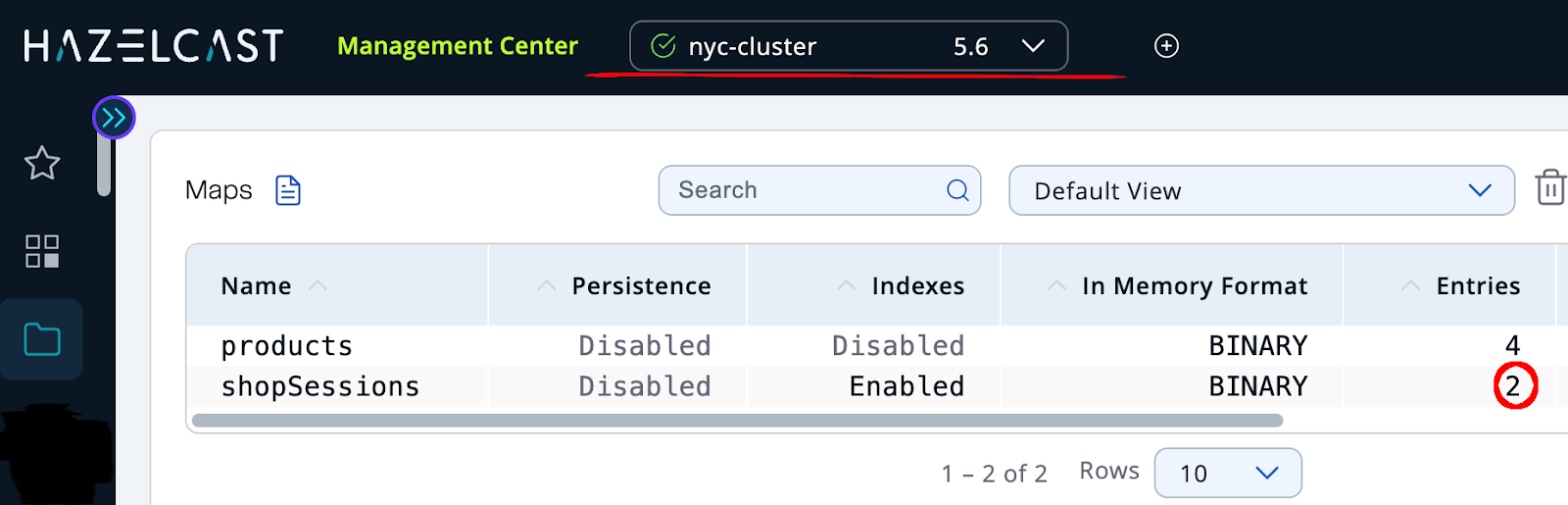
With both clusters running (using docker-compose up), we can start the application, add items to a basket, and observe the session entries appearing in both clusters via Hazelcast Management Center:
Now, let’s simulate a regional outage by shutting down the London cluster:
docker-compose down london-cluster
The application continues working without interruption. The Hazelcast failover client automatically connects to the remaining NYC cluster, and users can keep adding items to their basket without losing their session.
Next, we bring London back:
docker-compose up london-cluster
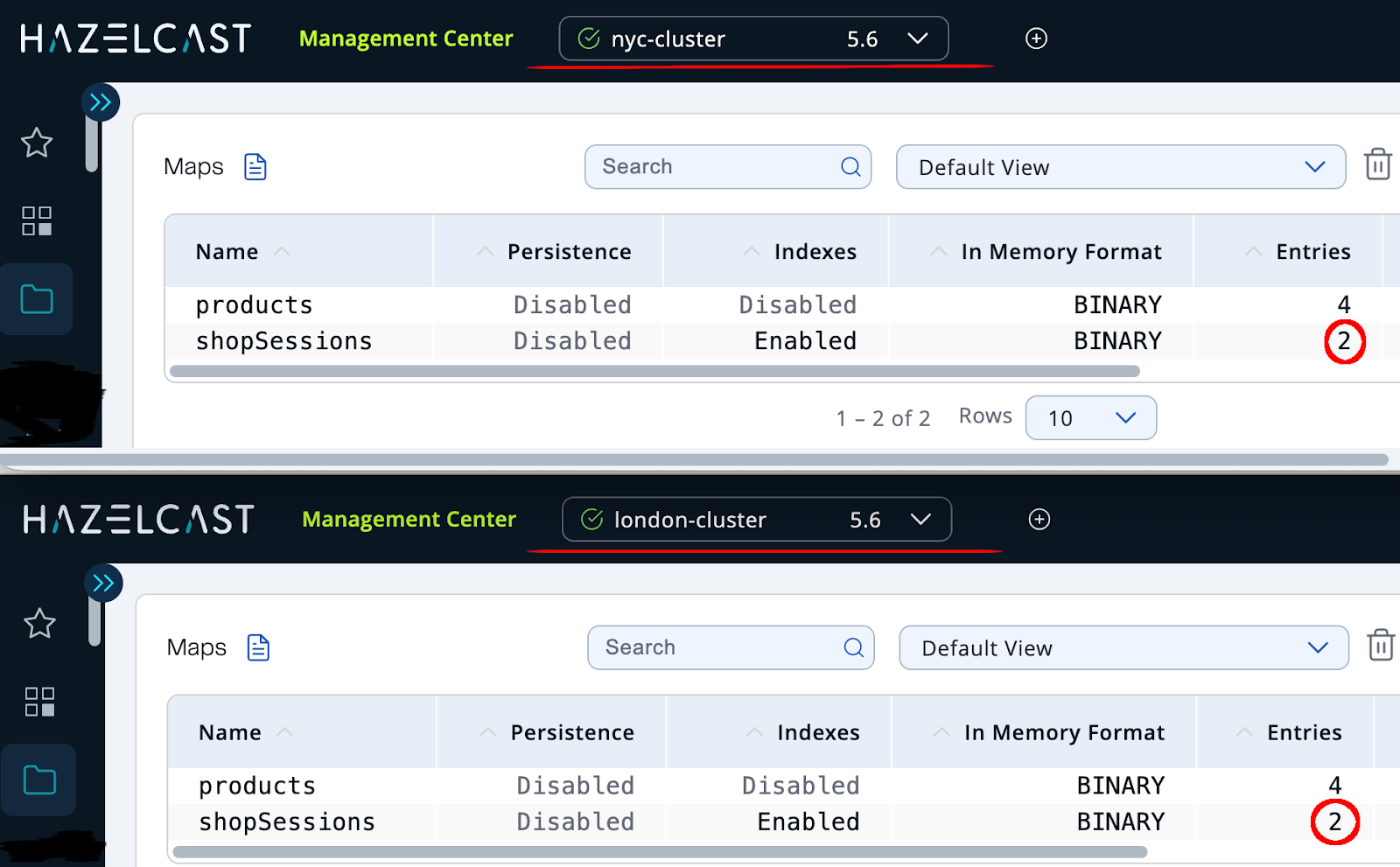
After a few seconds, WAN replication re-synchronizes the session data between clusters. Looking at the Management Center again, we can see the restored entries, confirming both regions are once again fully aligned.
From local sessions to global resilience
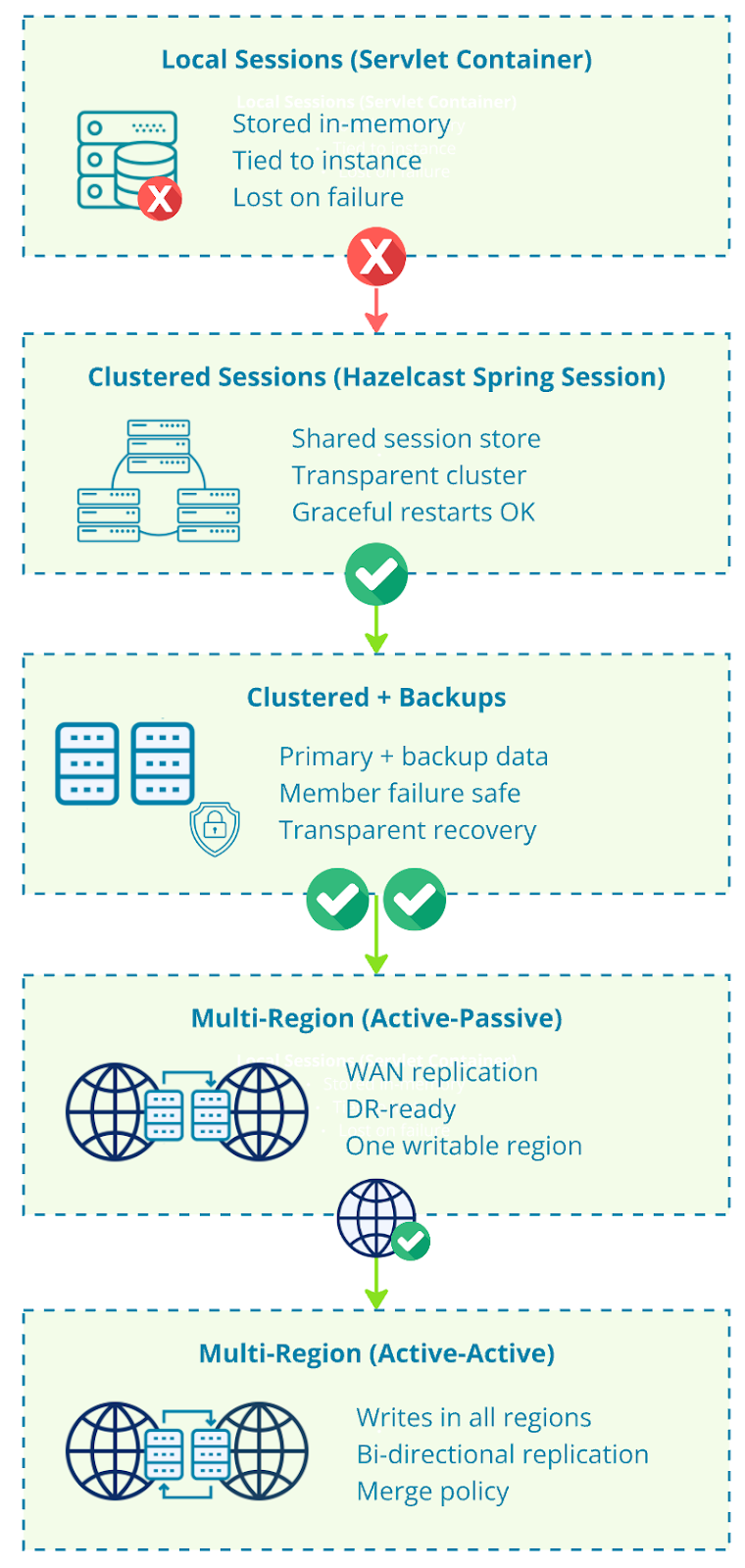
With a small amount of configuration and no changes to your application code, we turned a plain HttpSession into a distributed, fault-tolerant system.
Sessions are no longer tied to a single server.
They survive instance restarts.
They can replicate across regions.
They can even run active-active with Hazelcast Enterprise.
And the application code stays exactly the same.
What starts as a simple dependency and annotation can evolve into a production-ready, multi-region session architecture. Even if there’s a complete blackout in the server room, your users can still come back and finish buying tons of cheap-but-not-necessary stuff on Black Friday!
Resilient user sessions are easier than you think!
How to get started
For the full example, please visit our code samples repository on GitHub
You can get Hazelcast Open Source from Maven Central or using other supported ways.
You can also try Hazelcast Enterprise for great features like WAN replication – get a trial license here and download the distribution from our webpage or install it in another supported way.
Hazelcast Spring Session repository: https://github.com/hazelcast/hazelcast-spring-session
Spring Session Core repository: https://github.com/spring-projects/spring-session